
Driving Licence
The system collects your official document directly from the Ministry of Road Transport and Highways (MoRTH) records and safely stores it in your DigiLocker account for future use.
You can store your Driving Licence safely in DigiLocker and access it anytime from your phone. It works as a valid digital document and can be shown when required by traffic authorities.
Open and Login
- Start by opening the DigiLocker app on your phone or visit the official DigiLocker website in your browser.
- Log in using your username and password. If you are using DigiLocker for the first time, you will need to create an account. Usually, you will be asked to enter your Aadhaar number to complete the registration process.
For Documents Searching
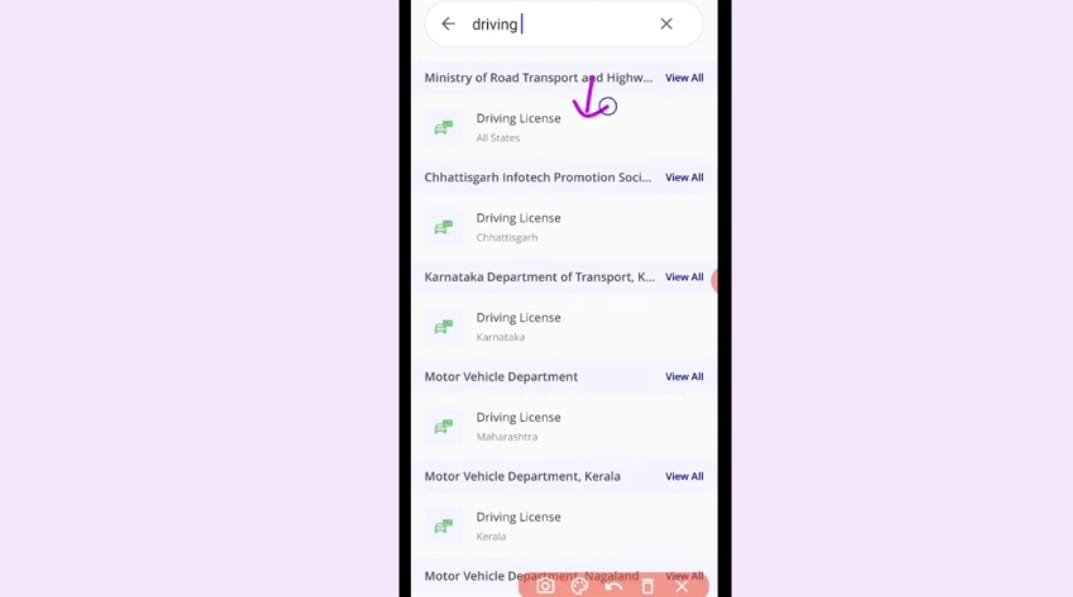
- Go to the “Search Documents” section.
- Search for “Driving Licence” and select the document from the list.
Choose the Issuer:
- You’ll need to choose the State or Union Territory Transport Department that issued your driving license. Sometimes, you may also see an option called “Ministry of Road Transport and Highways – All States.” If that appears, select the option that matches where your licence was actually issued.
Enter Your Details:
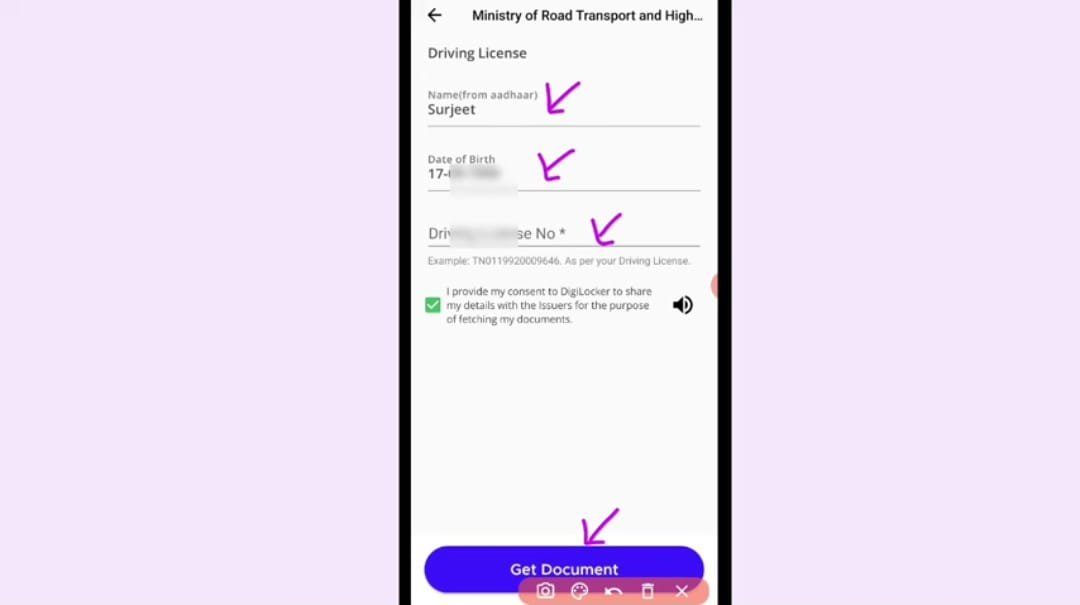
- The page will show some pre-filled details (like your Name and Date of Birth) pulled from your Aadhaar/DigiLocker profile.
- Enter your Driving Licence Number.
Fetch and Save:
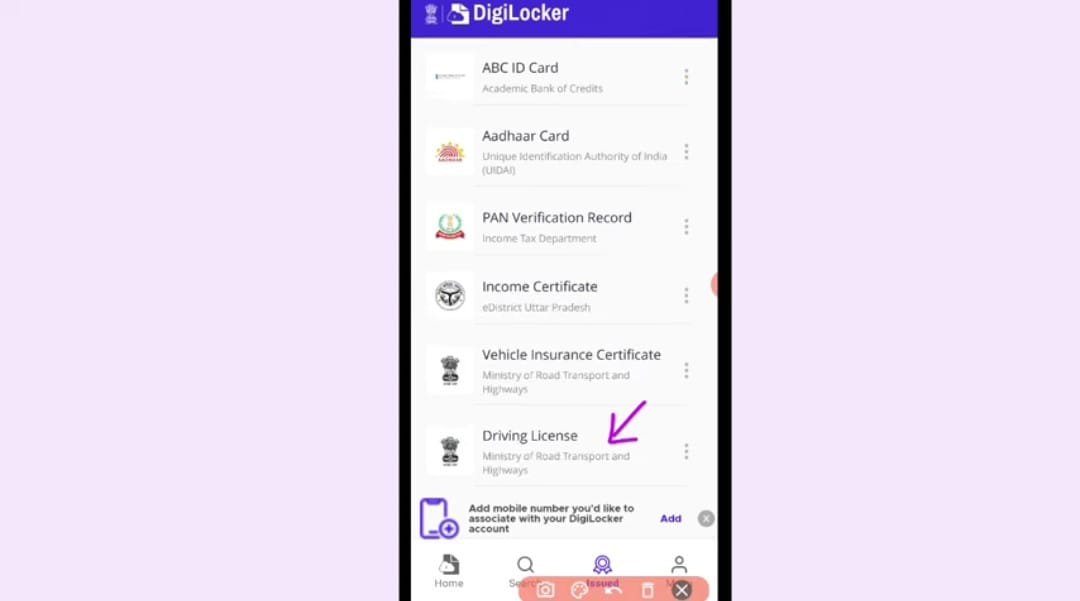
- Tap on “Get Document” or “Get Details” to continue.
- DigiLocker will then connect to the official government database, such as Parivahan, ABC ID, and securely pull your digital Driving Licence.
- After the document is retrieved, it will be automatically stored in your “Issued Documents” section, so you can access it anytime when needed.
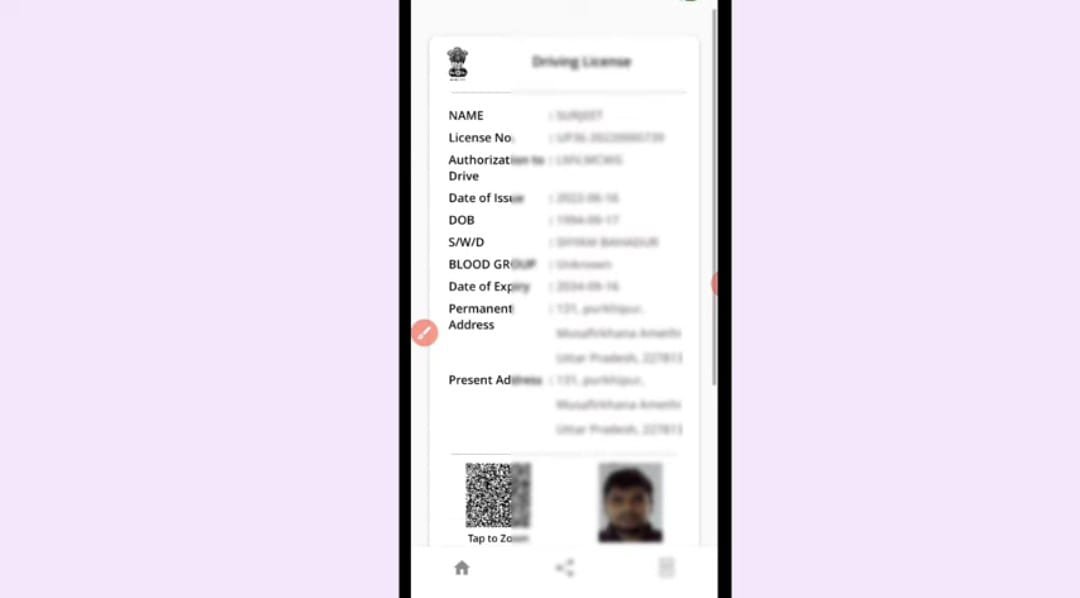
Why Should You Add Your Driving Licence to DigiLocker?
There are many benefits of keeping your Licence in DigiLocker:
1. Easy Access Anytime
You can open your licence on your phone whenever needed. No need to search for your wallet or documents.
2. Safe and Secure Storage
Physical licences can get lost or damaged. DigiLocker keeps your document safe online.
3. Accepted by Authorities
Digital Licences from DigiLocker are valid during traffic checks and other verification processes in India.
4. Useful During Emergencies
If you forget your wallet or lose documents, you can still show your licence using your phone.
Important Highlights to Know
Legal Validity:
The digital copy of your Driving Licence stored in DigiLocker is officially valid. Traffic police and transport departments across India accept it. This is allowed under the Information Technology Act, 2000, and also supported by guidelines issued by MoRTH.
Original Source:
DigiLocker gets your document directly from official government databases like the National Register and Parivahan portal. Because the document comes from the original government system, it is treated the same as your physical licence.
Troubleshooting:
If your Licence is not showing in DigiLocker login App, it is usually because the details you entered do not match government records. Even small mistakes in your name or date of birth can cause this problem. If this happens, you may need to contact your nearest RTO or the related government office for help.
Is DigiLocker Driving Licence Legal in India?
Yes. The Government of India has approved DigiLocker documents. Many transport departments and traffic police across states accept digital licences shown through DigiLocker.
However, it is still good to check local rules in some areas, especially if you are travelling to a different state.
When is DigiLocker Driving License Most Useful?
It helps in many daily situations like:
- Traffic police checking
- Vehicle document verification
- Identity proof in some cases
- Online applications needing licence proof
Tips for Safe Use
- Always keep your DigiLocker app updated
- Never share your login OTP with anyone
- Use a strong password for safety